
What members get
Practice first. Then run it for real.
Everything inside The Systemized Owner, described plainly: what each piece does, when you use it in the 12 modules, and what it does not do.
Module 6, before you open a single account
The Practice Bank
A pretend online bank for Ridgeline Kitchen and Bath, a made-up remodeling company. Six accounts, two credit cards and eight practice weeks: a normal week, a short week, a late client payment, the week the Vault fills and more.
You make the weekly money move with transfers, the way you would in a real bank app. Then the Practice Bank checks your move against Ridgeline's workbook and tells you what to fix, with the reason.
- Not a real bank. No real money moves, and nothing connects to your bank.
- Progress saves in your browser on that device.
- Stuck? It can show you the answer, and your Money Coach can walk the same week with you.

Four practice tools
Books, Bid, Draws and Payroll
Each tool opens with its module. Every one works the same way: practice with feedback on Ridgeline, then a real-week run without hints until it says READY, then My business, where you write your own rules next to how the system does it. Copy for Claude packages your answers for your AI assistant.
What they are not. They are practice. They do not connect to your bank, your books or your payroll, and nothing you type leaves your browser unless you copy it. Progress saves in your browser on that device.
Module 6, before your first real money move
Practice Books
Step 1 of the weekly money move on a made-up Ridgeline week: pay both credit cards, then match or categorize every bank and card line waiting for review.
- Bills paid in two halves, one payment that covers several bills, and job costs vs overhead
- A duplicate feed line, a charge on the wrong card, recurring payees and an owner draw
- Its last week hands its numbers to the Practice Bank, so you can run steps 1 to 5 in one sitting

Module 3, Estimating and Pricing
Practice Bid
Turn a written scope into a priced estimate: count crew days per phase, price every line, run the pre-send check, read break-even and target, and build the payment schedule.
- Two Ridgeline bathroom scopes, one permitted and one not
- Ridgeline's markup is a made-up sample. In My business you use your own numbers, and the tool never suggests a markup
- Practice what to do when a client pushes on price, without cutting your profit

Module 4, Contracts, Payments and Change Orders
Practice Draws and Change Orders
Three scenarios on one signed job: build every payment request at signing, work the due-date desk when the schedule moves, and bill change orders, allowance overages and credits.
- Send each request on its due date, never early, to one invoice contact
- A permit delay that moves every due date, a late payment and a final with punch items still open
- My business builds your own payment schedule and shows what is owed today

Module 8, Hiring and Running Crews
Practice Payroll Review
The Wednesday punch check on a made-up pay week: match each time punch to the schedule, the crew's daily update and photos, then flag the job that ran over its priced crew days.
- Fix the scope on a punch, split a day when the update shows two kinds of work
- Anything you cannot prove, like a wrong job or a missing clock-out, goes to the owner as a question
- My business runs the same crew-days check on your own punches

AI assistants
Six assistants in your own Claude account
You set each one up in your own Claude account, about 10 minutes each, with the rules from the course and your own Master Business File. We never see your account or your files.
Business Brain
Your everyday assistant: client messages, follow-ups, scheduling, your weekly rhythm and where you are in the program.
Estimator
Turns walkthrough notes, photos and sketches into a scope and a line-item estimate draft, priced only from your own Pricing Calculator results.
Money Coach
Walks you through the weekly money move with your own settings and the balances you read from your bank app. It does the math. You make every transfer.
Hiring Assistant
Job posts, screening against your own rules and reply drafts. It sorts and summarizes. You decide.
Marketing Assistant
Drafts Google Business Profile posts, review replies and website answers in your voice. Drafts only. You post.
Owner Backup Guide
Helps your spouse or second-in-command keep things running from your Owner Backup Plan, one step at a time. Also runs the practice drill.
The line they never cross. Claude drafts and does the math. You send, approve and move the money. AI can make mistakes, so you check its work before it goes to a client, a crew member or an agency. Claude Pro is required: $20 a month, paid to Anthropic, not to us.
Module 6, then every week on your money day
The weekly money run
Six accounts: Income, COGS, Tax, OpEx, Vault and Profit. Once a week you get the books ready (steps 1 to 4), then make one money move (step 5). The Money System workbook does the math in the order the system sets. Your tax percentage comes from your CPA.
An optional scheduled task in Claude, Weekly Money Move Prep, gathers the bills that count and the move order before you sit down. You still check the balances and make every transfer yourself.
The Weekly Run puts the whole week on one page: what to say to Claude, which file to open and what done means, with rows added as you finish each module.
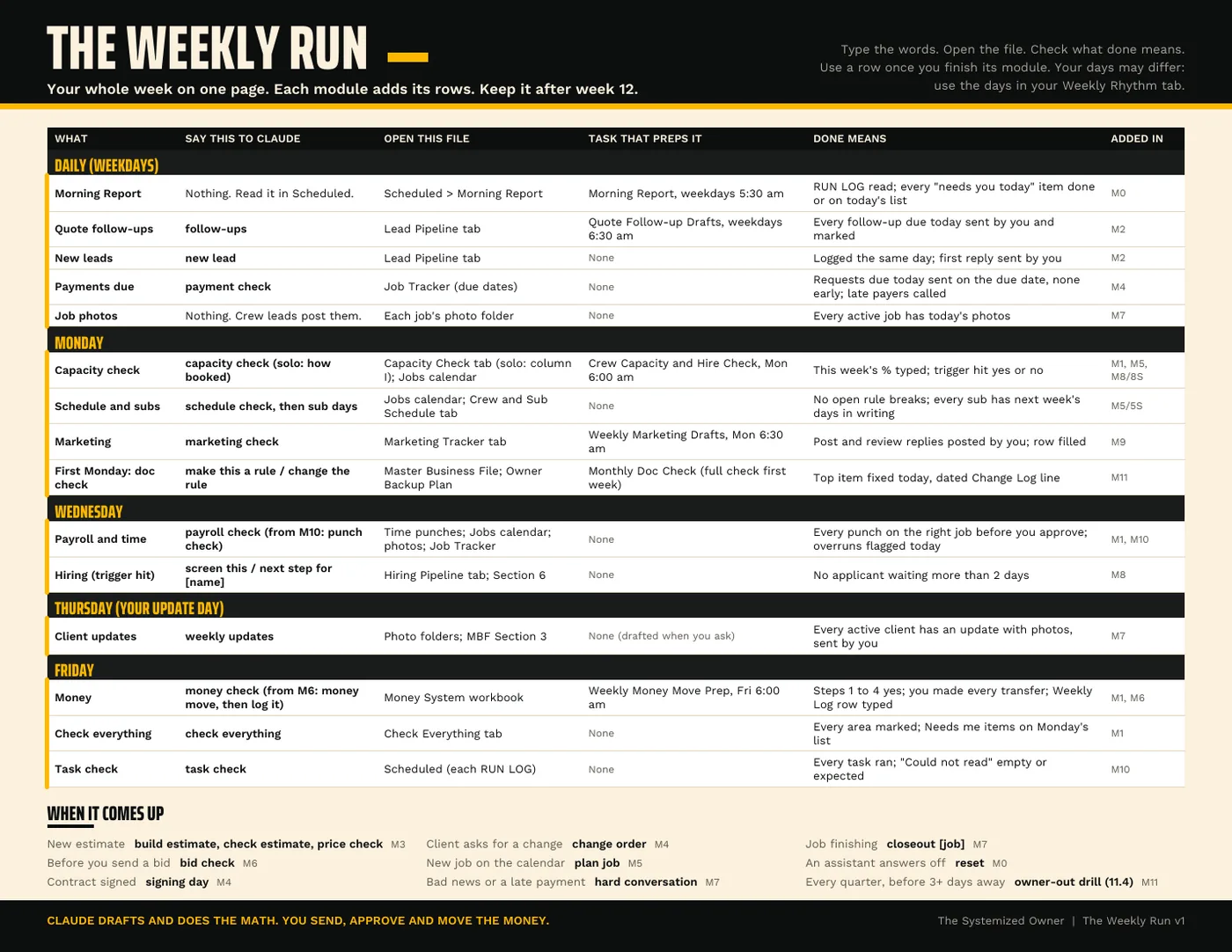
Members. Module 11
The Owner Backup Plan
What happens to your business if you can't work tomorrow, written down: who to call first, how payroll runs, where the money is and what can wait.
- Members: the fill-in plan, then Module 11 builds it out with your spouse or second-in-command, loads it into the Owner Backup Guide, and adds a practice drill to run before you are away.
- No passwords or full account numbers in the plan. Not legal advice: it ends with questions for your attorney and insurance agent.

See it before you join
An example week, start to finish
Week 5 for Ridgeline: a client draw is late and COGS is short. Steps 1 to 4 are done, the balances go in, and the workbook gives the move order. Here it is one transfer: everything to COGS, nothing else moves.
Members get the blank workbook for their own numbers and run this same week in the Practice Bank first.

See the plans
Founding members pay $197 a month or $1,970 a year, locked for the first 50. Every plan, its price and its renewal and refund terms are on one list.
See plans and pricing